

Reading the Match & assign map
What each dot, color, ring and square means on the map under Match & assign, and how to use it to decide who can really get to a job.
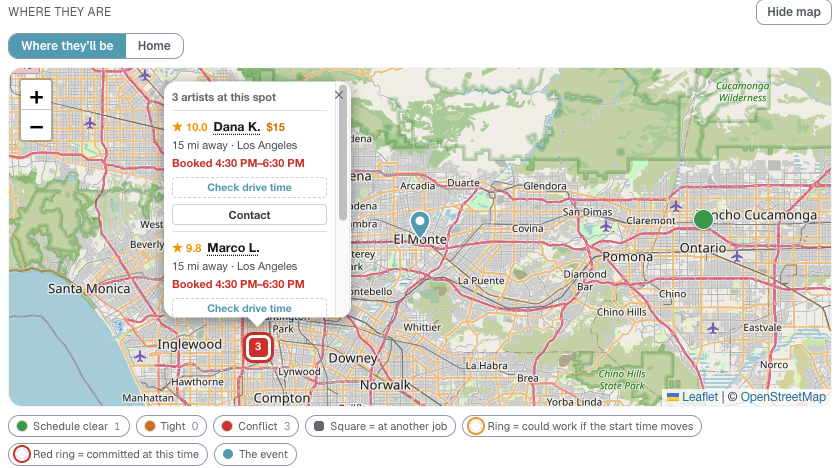
When you open Match & assign on a shift, the people it suggests are also drawn on a map underneath the list, under Where they are. The list and the map always show the same people.
Where they'll be, or Home
Two buttons above the map change where each person is drawn.
- Where they'll be (the one it opens on) puts each person where they will actually be when this shift starts. Someone working another job at that time is drawn at that job. Someone who finishes a job before your shift is drawn at the job they just finished, because that is where their drive starts.
- Home puts everyone at their home address.
⭐ Where they'll be is the honest answer to "who is close?" Someone who lives ten minutes away but is across town at a party until 2 PM is not ten minutes away at 2 PM.
The color of a dot
The fill is the same reading as the colored note on that person's row in the list.
- Green (Schedule clear): nothing else that day gets in the way.
- Amber (Tight): they can make it, but with less than 30 minutes to spare once the drive and your buffer time are counted.
- Red (Conflict): they are booked during this shift, or they cannot get from one job to the other in time.
- Gray with a red border (Hasn't picked this zone): only appears after you tick Include available artists outside this zone. They are free, but they have not chosen this area as somewhere they travel.
Your own booking is the teal pin.
Two jobs at the same venue, one straight after the other, always read as green. Nobody has to drive.
A square instead of a circle
A square means that person is at another job when your shift starts, rather than at home. It only appears in Where they'll be.
A ring around the dot
Some red and amber dots have a ring. The ring answers one question: could moving the start time fix this?
- Gold ring: could work if the start time moves. Their only problem is getting here from their earlier job. If the client can start a little later, this person may be able to make it.
- Red ring: committed at this time. They are either booked straight through your shift, or they are due somewhere else afterward. A later start does not help, and can make the second problem worse.
- Double red ring: booked before and after. Walled in on both sides.
⭐ A gold ring is the one worth a conversation with the client. A red ring usually is not.
The key for the rings only shows under the map when at least one ring is on screen.
A number on a dot
A number means several people are in the same spot, usually a group working the same job. Tap it to see each of them.
Tapping a dot
A bubble opens for that person, showing:
- their rating and name. Tap the name to jump to their row in the list.
- their travel fee, if this job has one for them.
- how far away they are, and from where: their home, or the city of the job they are at.
- one colored line saying what their day looks like. For example Day is clear, Booked 12:00 PM–4:00 PM, or Finishes 1:00 PM · 25 min drive, 10 min to spare.
- Contact, to send them your message. Once you have asked them it reads Waiting for reply, or Replied yes.
To assign someone, use Assign on their row in the list. The bubble is for looking, not committing.
Check drive time
For someone who is in the middle of another job when your shift starts, Logidex does not know the drive yet, because they are already a conflict. Their bubble has a Check drive time button. Press it and it looks up the real drive from where they are to your job.
Use it when you are wondering whether moving the start time would let that person come straight over.
Quick answers
- "Someone is missing from the map." People who said No are left off. Everyone else in the list is on it.
- "Someone booked at another job later that day is drawn at home." They are drawn where they are when your shift starts. If their other job has not started yet, that is home.
- "There is no map at all." The booking has not been placed on the map yet. See No map or miles on a booking.
Last updated