

When someone can't make a shift
What happens after a request lands, who gets asked, and how to stay in control of it — including the setting that decides whether anything sends without you.
When somebody on your team cannot make a shift, they raise it from their portal. You are told immediately, and nothing reaches your roster until you decide.
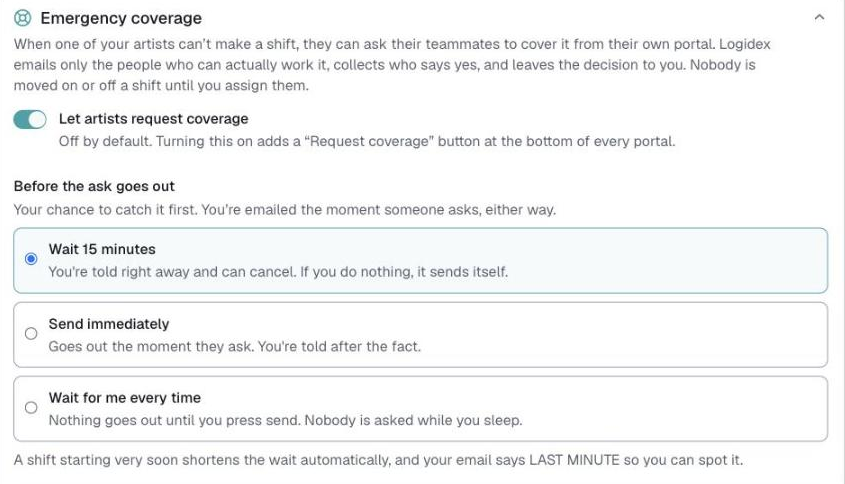
Turn it on first
Customize → Contact → Emergency coverage. It is off until you switch it on.
The setting that matters most is the hold:
- Wait for me every time — nothing ever sends without you pressing send. Start here.
- A number of minutes — you get that long to intervene, then it goes out on its own.
- No wait — it sends immediately.
What you see
An email, and a card on your dashboard. The card is where you act.
⭐ Press "See who gets this" before anything sends. It lists, by name, exactly who would be asked — and you can untick anyone. Approving a message to your roster without seeing the recipients is the thing this button exists to prevent.
Then either Send it now, or Cancel — I'll handle it.
Who gets asked
Only people who could genuinely do it: the right service, free at that time, close enough to get there, with portal access, not already booked, and not pushed over any hour limits you have set.
Artists you have marked emergencies only are included here. That is the one feature they exist for.
When people say yes
They land in the same shortlist you already use on the shift, alongside anyone you contacted yourself. Several people can say yes; you still choose.
Nobody is assigned by you saying nothing — except in one case.
The one time it assigns for you
If a shift is within the next day and somebody has said yes, Logidex will assign them rather than let the job go unstaffed while you are asleep. There is a short grace period first, and you can stop it entirely by pressing I'll pick myself on the card.
Both the window and the grace are yours to change in the same settings.
If nobody is eligible
Nothing is sent to anybody. The card turns red and tells you why — everyone booked, everyone over their hours, nobody near enough. That is a staffing problem to solve, not a message to send.
Last updated