

When you need one person to do two services
Use Also needs on a shift when the same person should do more than one thing, like face painting and balloons. Here is what it changes, and what it leaves alone.
Sometimes a client wants one person who can do two things: face painting and balloon twisting, for example. You do not need two shifts for that. Add the second service to the same shift under Also needs.
Adding a second service
- On the booking, click the shift's time to edit it.
- Under the service, find Also needs and pick the extra service. Add more than one if you need to.
- Save.
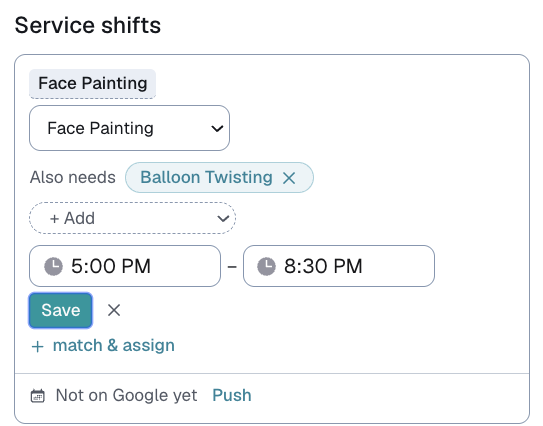
The shift now shows both names together, for example Face Painting + Balloon Twisting.
You can also add or remove an extra service from Services needed at the top of Match & assign. It saves to the shift either way.
To take one off, press its name to remove it.
Who Match & assign suggests
With more than one service on a shift, Match & assign only suggests people who do every one of them. Someone who does face painting but not balloons will not appear.
⭐ If nobody shows up, loosen the combination. Remove a service from Services needed, find someone for the main one, and adjust what you ask for. A combination nobody on your roster does is a sign to split the job.
What stays the same
The first service is the main one, and it still decides:
- Pay. A shift has one pay amount, however many services it lists.
- The Board, Suggest and emergency cover. These only look at the main service. That is deliberate: emergency cover sends messages automatically, and someone who only does the extra service should never be asked to cover the whole shift.
Your messages
Your contact messages do not change on their own. [RequestedService] still fills in the main service only.
To name every service in a message, add the [AllServices] pill to your template in Customize → Contact. It fills in the whole combination, for example Face Painting + Balloon Twisting. On a shift with one service, it simply fills in that one.
The calendar invite
When you push the shift to Google Calendar, the invite names both services.
Last updated