

Creating your account, and the three questions Logidex asks first
What you are asked when you sign up, why it is asked so early, and how to change any of it later.
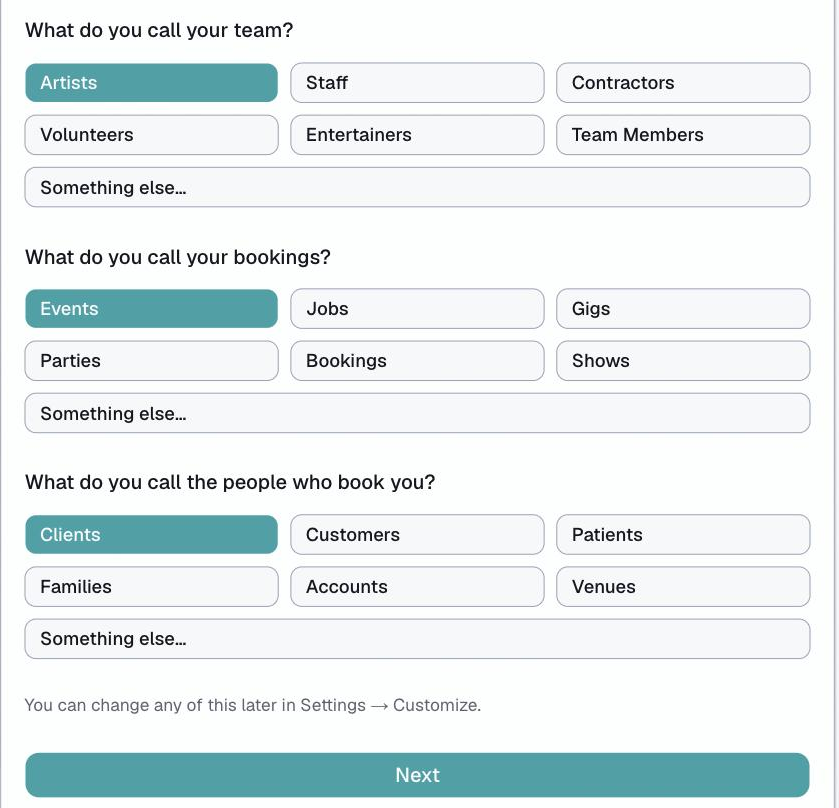
Signing up takes a minute and asks you three things. They are asked at the very start because every screen you see afterwards uses the answers.
You do not need a credit card, and you get 30 days.
What you are asked
What do you call your team? Pick from the list, or choose Something else… and type your own. Artists, caregivers, technicians, crew, staff — whatever your business actually says out loud.
What do you call your bookings? Same idea. Events, visits, jobs, shifts, appointments.
Your timezone, clock and date format. Whether times read as 1:30 PM or 13:30, whether dates read 06/21/2026 or 21/06/2026, and whether your week starts on Sunday or Monday.
Why it asks so early
Logidex prints those words everywhere — in the menu, on every button, in the messages you send your staff. Choosing them first means you never read a screen that calls your caregivers "artists".
The timezone matters even more. Every shift time, every calendar invite and every reminder is worked out from it, so getting it right at the start avoids a whole class of confusing mistakes later.
Changing it later
All of it, any time, in Settings → Customize.
- The words are under Terms
- Timezone, clock and date format are under Engine
Changing a word updates it everywhere at once. Nothing is stored twice, so there is no clean-up to do.
What happens next
The last screen of signup lays out the order to set things up in. It is worth following — each step feeds the next, and doing them out of order means redoing work.
That order is explained in the setup order that works.
Last updated